Graphics · Interactive web app
CubeSolver 3D
Enter a scrambled Rubik's Cube, get a verified ~20-move solution, and follow it turn by turn on an animated 3D cube.
Stack
- JavaScript
- Three.js
- Web Workers
- Node.js test runner
- Playwright
- Vercel
- moves per solution, found in milliseconds
- ~20
- moves per solution, found in milliseconds
- automated tests
- 27
- automated tests
- random move sequences cross-checked
- 2,000
- random move sequences cross-checked
- main-thread blocking: the solver lives in a worker
- 0
- main-thread blocking: the solver lives in a worker
What it does
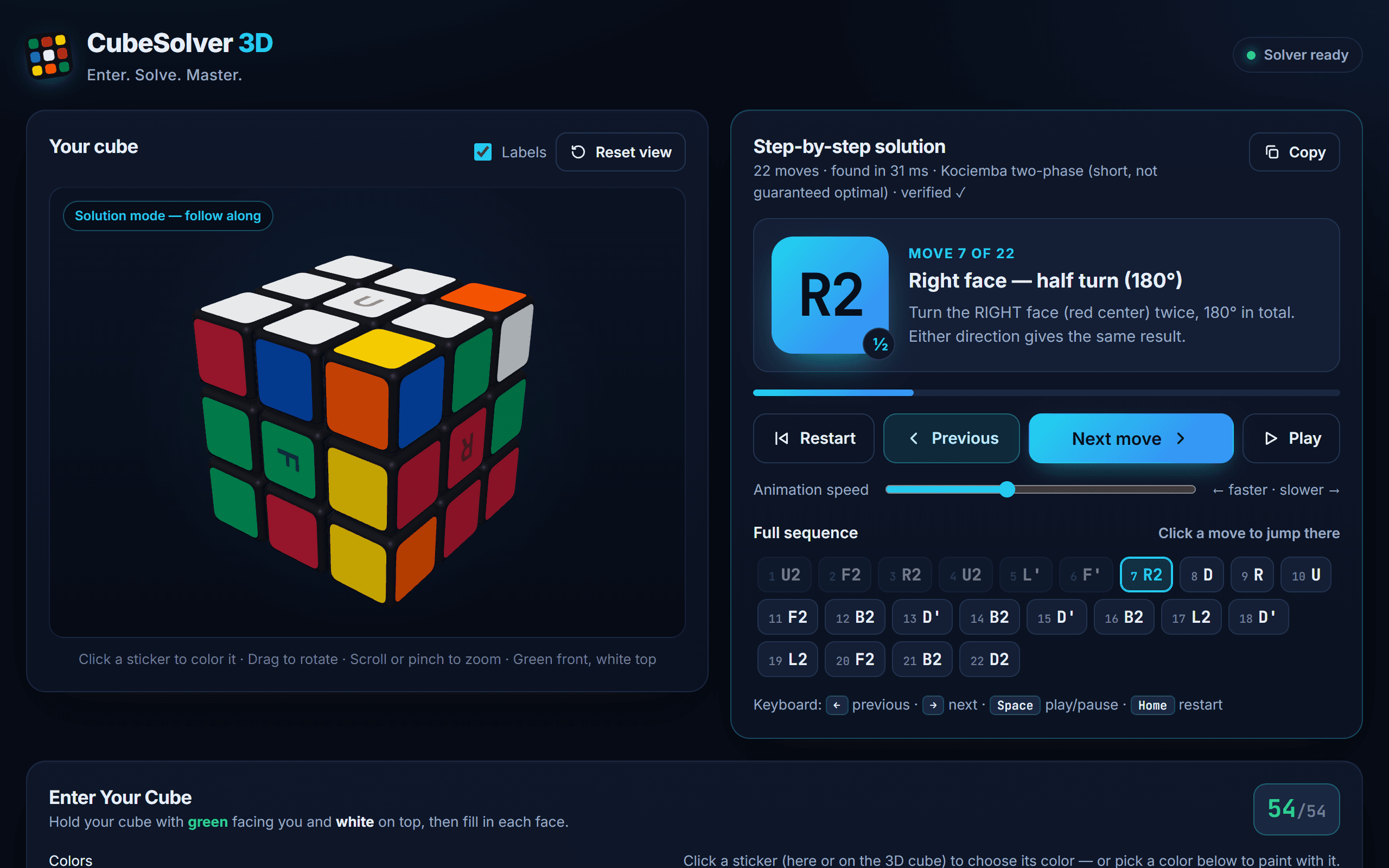
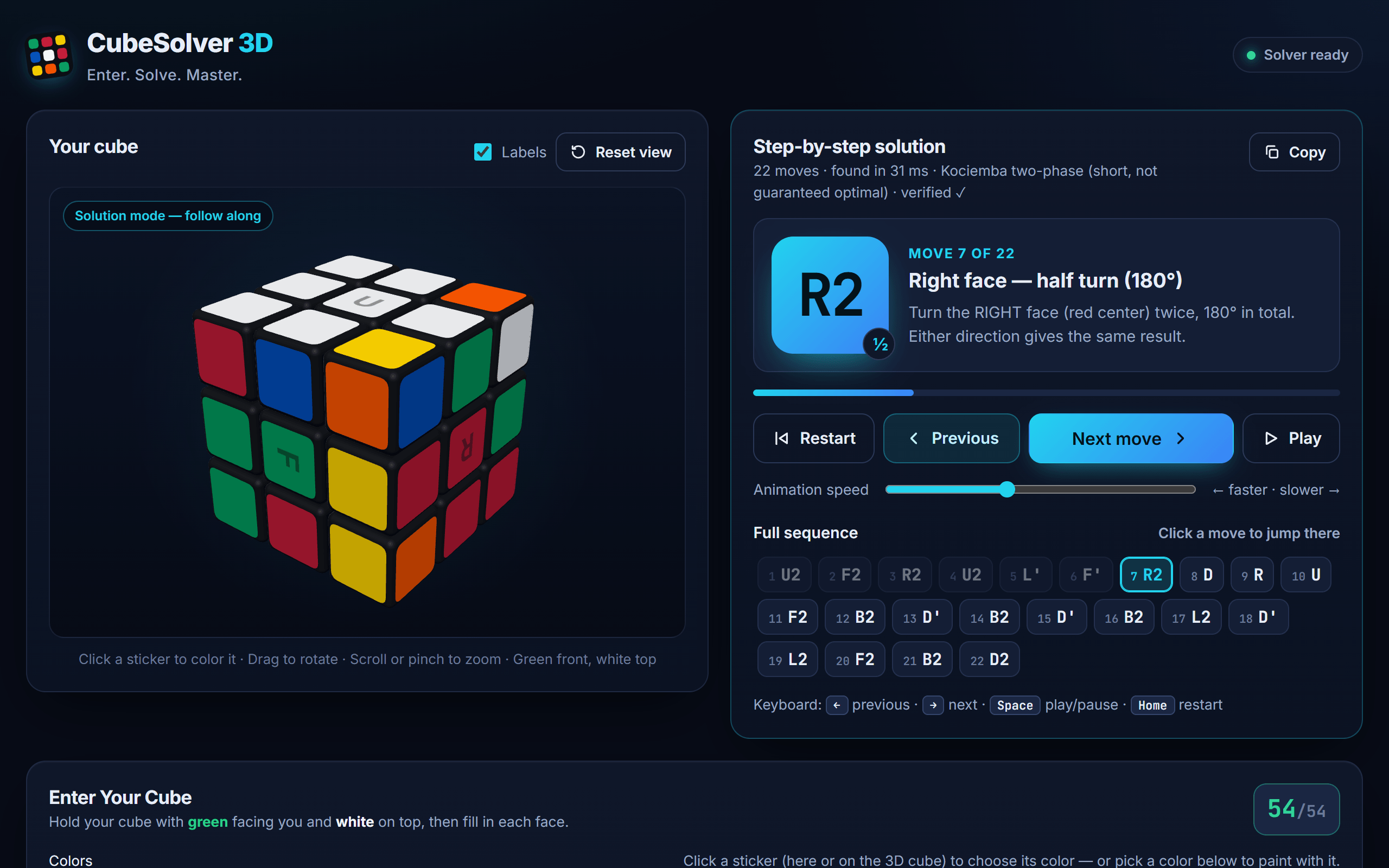
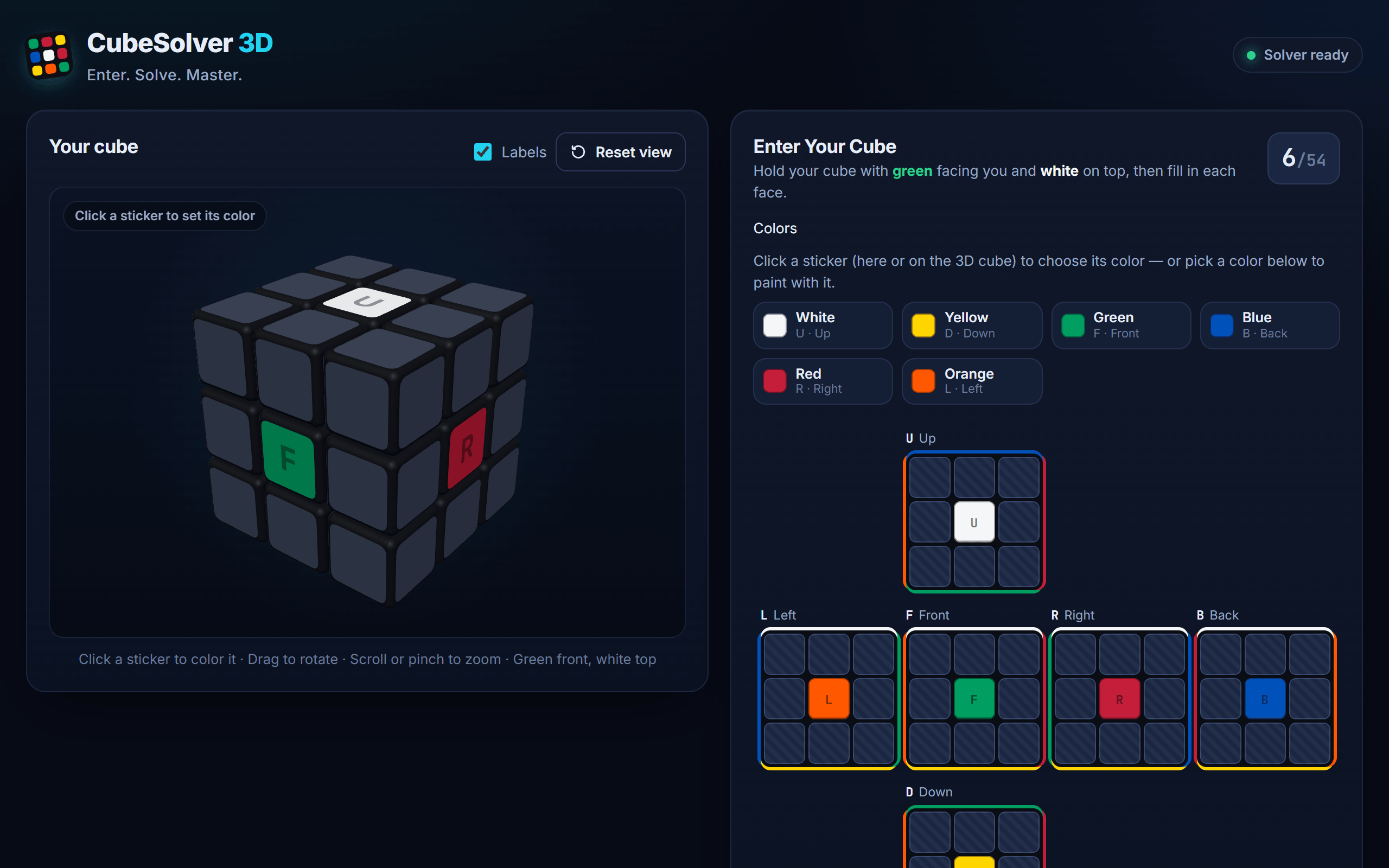
You hold a scrambled cube with green facing you and white on top, and enter its six faces into an unfolded-cube grid: click a sticker and pick a color, press keys 1–6, or choose a color from the palette and paint with it. Press Validate, then Solve. The app returns a move sequence and animates it on a Three.js cube, one layer turn at a time, so you can make the same turn on the cube in your hands.
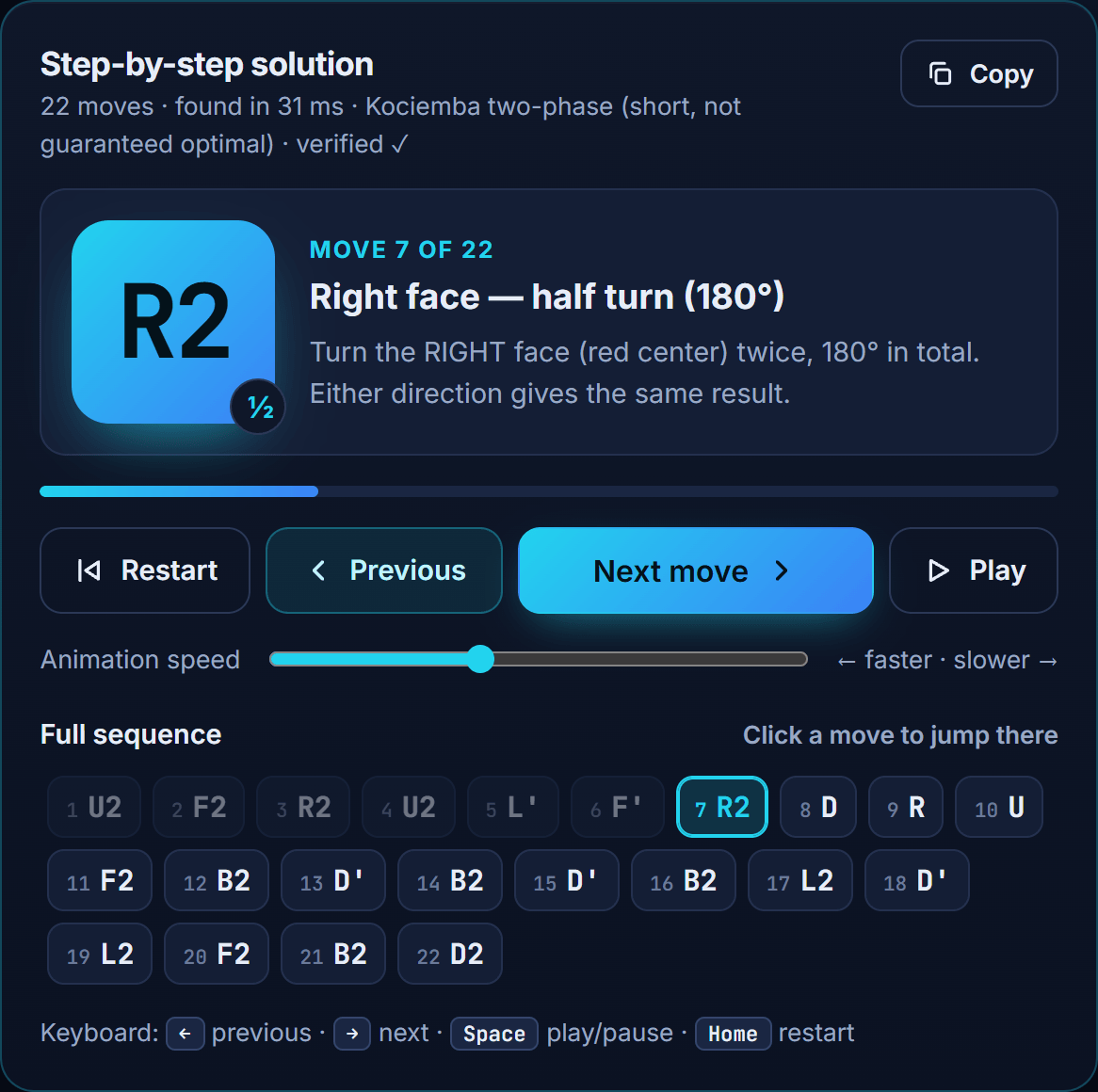
- Next, Previous, Restart and Play controls, plus keyboard shortcuts (
→,←,Space,Home,Vto reset the camera). - A plain-language explanation of every move, for example "Right face, half turn (180°)".
- A clickable move list to jump anywhere in the solution, and a copy button for the whole sequence.
- Explanations when input is impossible, with the offending stickers highlighted.
The problem
Solving a physical cube from an arbitrary state is really four problems: turning 54 colored stickers into a model a program can reason about, rejecting states that cannot exist, finding a short solution fast, and presenting it so a person can follow along with a cube in their hands. Each one fails in its own way: a misread sticker, a frozen tab, a sequence that drifts out of sync with the animation. The design aims to make each of those failures either impossible or loudly visible.
Architecture
There is one cube format everywhere: a 54-character facelet string in Kociemba's U R F D L B order, nine stickers per face. It is exactly what the solver library's Cube.fromString() expects, so the input grids, validator, solver and player all share it, and grid button n on the page is facelet index n.
Main thread
Web Worker
| Module | Responsibility |
|---|---|
| cube-state.js | Logical cube: facelet format, 3D sticker geometry, moves as rotations |
| cube-validation.js | Is this a physically possible cube? |
| solver.js | Promise wrapper for the worker, plus the solution safety check |
| solver-worker.js | Runs cube.js (Kociemba two-phase) off the main thread |
| cube3d.js | Three.js cube: 26 cubies, real layer rotations, camera |
| solution-player.js | Next / Previous / Restart / Play; keeps 3D and logic in sync |
| color-input.js | Sticker grids, color popover and paint brushes |
There is no build step and nothing to install at runtime. Three.js r160 and cube.js 1.3.2 are vendored, and the app deploys to Vercel as static files with immutable cache headers on vendor/.
The solving algorithm
Herbert Kociemba's two-phase algorithm splits an intractable search into two tractable ones. Phase 1 searches for moves that bring the cube into the subgroup G1 = ⟨U, D, R2, L2, F2, B2⟩, where every corner and edge is correctly oriented and the four middle-slice edges sit in the middle slice. Phase 2 solves the cube using only moves from G1, which can never undo that progress. Precomputed pruning tables give lower bounds that let an iterative-deepening search skip most branches.
In practice this gives solutions of usually 19–22 moves in milliseconds. They are short but not guaranteed optimal, and the app says so in the solution header.
Why a Web Worker
Before it can solve anything, cube.js builds its move and pruning tables, which takes a few seconds. On the main thread that would freeze the page. In a worker, the tables are built once in the background while you enter colors, and a status pill flips to Solver ready.
importScripts('../vendor/cubejs/cube.js', '../vendor/cubejs/solve.js'); let tablesReady = false; function ensureTables() { if (!tablesReady) { Cube.initSolver(); tablesReady = true; }} self.onmessage = (event) => { const { id, type, facelets } = event.data; try { ensureTables(); if (type === 'init') { self.postMessage({ id, type: 'ready' }); return; } if (type === 'solve') { const started = performance.now(); const solution = Cube.fromString(facelets).solve(); self.postMessage({ id, type: 'solution', solution, ms: performance.now() - started }); return; } // … } catch (error) { self.postMessage({ id, type: 'error', message: String((error && error.message) || error) }); }};On the main thread, CubeSolver wraps the worker in promises. Each request carries an id so replies can't be mixed up, solves have a 30-second timeout, and if the worker errors or times out every pending request is rejected and the worker is torn down, so the next solve starts with a fresh one.
Validation: is this a real cube?
cube.js does not validate its input, so the app does it first. A state is only reachable by turning faces if it passes all six checks below. Failing the last three means the cube was taken apart and reassembled, or (much more likely) a sticker was misread.
- Every sticker has a color, and each color appears exactly 9 times.
- The six centers are six different colors.
- Every corner and edge shows a color combination that exists on a real cube, and each of the 8 corners and 12 edges appears exactly once.
- Corner twist: the sum of corner orientations is divisible by 3.
- Edge flip: the sum of edge orientations is divisible by 2.
- Parity: the corner and edge permutations are both even or both odd. Otherwise exactly two pieces are swapped.
Corner twist
Σ corner orientations ≡ 0 (mod 3)
Each corner has 3 orientations, set by which sticker carries the U/D color. A single twisted corner is impossible.
Edge flip
Σ edge orientations ≡ 0 (mod 2)
Each edge is either flipped or not. A single flipped edge is impossible.
Permutation parity
parity(corners) = parity(edges)
Every quarter turn swaps an odd number of pairs of both. If they disagree, exactly two pieces were swapped.
/** Number of transpositions parity of a permutation: 0 = even, 1 = odd. */export function permutationParity(permutation) { const seen = new Array(permutation.length).fill(false); let parity = 0; for (let i = 0; i < permutation.length; i++) { if (seen[i]) continue; let length = 0; for (let j = i; !seen[j]; j = permutation[j]) { seen[j] = true; length++; } parity ^= (length - 1) & 1; // a cycle of length L = L−1 swaps } return parity;}Errors are written for people, not programmers. Instead of "invalid input" you get messages like Red and Orange are opposite colors and never touch, and the stickers involved flash red.
Trust, but verify
Even with valid input, the app does not take the solver's word for it. Every returned sequence is re-applied with the app's own, independent move model, and any sequence that does not produce a solved cube is rejected instead of shown. It also handles one quirk explicitly: cube.js returns a non-empty sequence for an already-solved cube, which the app reports as Already solved.
export function verifiedSolution(facelets, rawSolution) { if (isSolvedFacelets(facelets)) return []; if (typeof rawSolution !== 'string' || !rawSolution.trim()) { throw new Error('The solver did not return a solution for this cube.'); } const moves = parseMoveSequence(rawSolution); if (!isSolvedFacelets(applyMoves(facelets, moves))) { throw new Error('Safety check failed: the computed moves do not solve this cube. Please re-check your input.'); } return moves;}Keeping the 3D cube honest
Moves are real rotations, not lookup tables. cube-state.js gives every sticker a 3D position and normal, and builds each move by rotating those integer vectors 90°, with exact arithmetic and no floating point. The Three.js scene rotates the actual cubie meshes using the same axis/direction table, so the model and the animation cannot disagree about what R means.
export const FACE_TURNS = { U: { axis: 'y', layer: 1, clockwiseSign: -1 }, D: { axis: 'y', layer: -1, clockwiseSign: 1 }, R: { axis: 'x', layer: 1, clockwiseSign: -1 }, L: { axis: 'x', layer: -1, clockwiseSign: 1 }, F: { axis: 'z', layer: 1, clockwiseSign: -1 }, B: { axis: 'z', layer: -1, clockwiseSign: 1 },}; /** * Rotate an integer vector by one quarter turn (+90°, right-hand rule) * around the given axis. Exact integer arithmetic — no floating point. */function rotateQuarterPositive([x, y, z], axis) { if (axis === 'x') return [x, -z, y]; if (axis === 'y') return [z, y, -x]; return [-y, x, z]; // axis 'z'}The player updates the logical state immediately, queues the matching animation, and afterwards reads the colors back from the 3D scene to confirm they match. The "Cube solved!" banner only appears once the rendered cube itself is confirmed solved.
Try the notation
R turns the right face clockwise as seen looking at it, R' counter-clockwise. Keys U D R L F B work too (Shift for ').
Sequence · 0 moves
Solved.
Testing
npm test runs 27 tests on Node's built-in test runner, with no dependencies:
- Move definitions match standard notation for all six faces, and X⁴ = identity.
- Agreement with cube.js on all 18 moves and on 2,000 random move sequences, so two independent models must produce identical states.
- Scramble + inverse = solved.
- UI color ↔ solver format mapping.
- Rejection of incomplete input, wrong color counts, flipped edges, twisted corners, swapped pieces (parity), and impossible, mirrored or duplicate pieces.
- The full pipeline (validation → cube.js → verification) on a known scramble plus 25 uniformly random cube states.
A separate Playwright end-to-end test drives the real page in headless Microsoft Edge: sticker entry by popover and paint brush, each validation error, solving, then stepping through a full solution while comparing the 3D scene with the logical state after every move. It also covers Previous/Restart/Play, keyboard shortcuts, three random scrambles, the absence of horizontal scroll at 390 px, and zero console errors or warnings.
Try the real thing
The deployed app is embedded below. It loads only when you ask, so this page stays fast. It works best on a laptop or desktop, or open it in its own tab.